
Themes
The Themes section of a site (Ctrl/⌘+3) lists the themes installed in the site, and the catalog of the Cecil themes.
Catalog
The catalog lists the themes published on Packagist, with their screenshot, version and description. Search it, or filter it:
- Visual themes (the default): the layouts and the styles of a site;
- Components: a feature added to another theme, such as a search engine or icons.
Refresh catalog loads it again (it is kept for 6 hours).
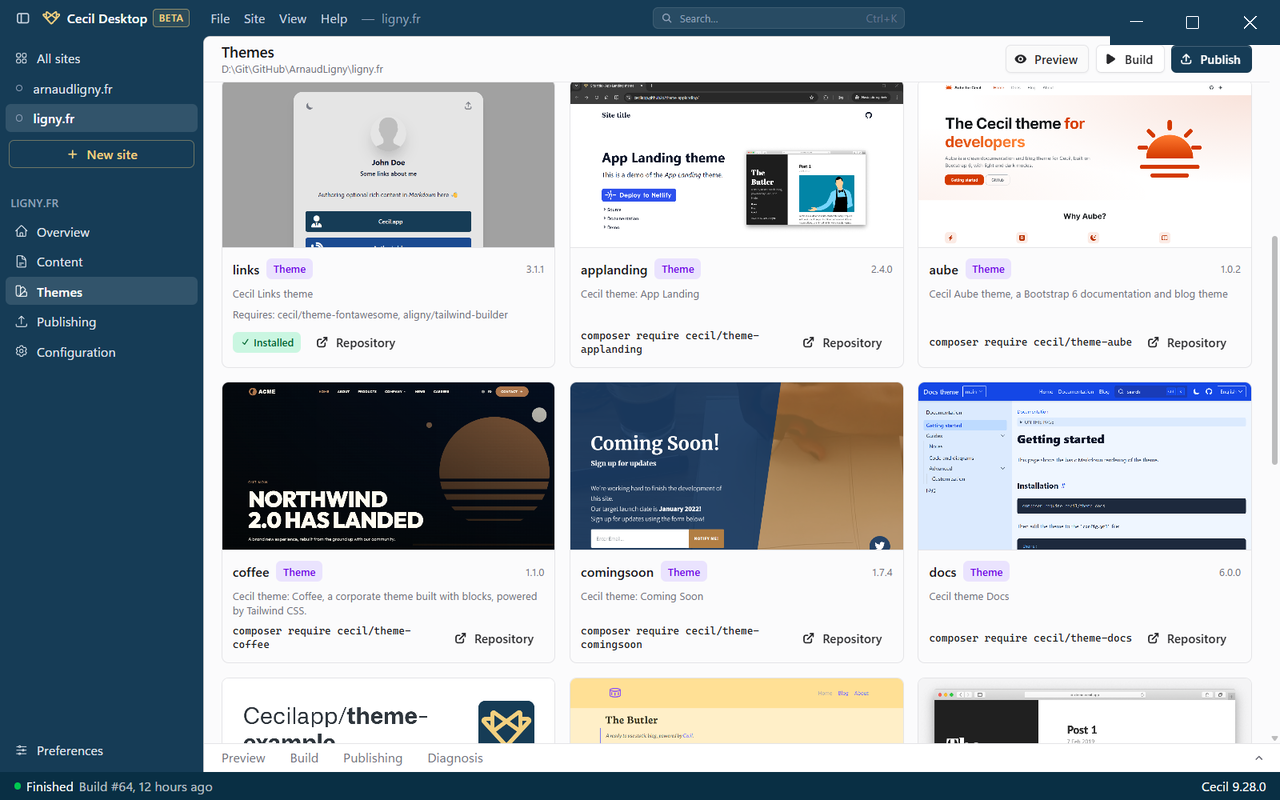
Install a theme
Click Install on a theme: it is downloaded into the themes/ folder of the site, with the themes it requires, and added first to the Theme(s) of the configuration, which is the highest priority. Composer is not required.
Installed themes
Each installed theme shows its version and source:
- installed by the app: Update appears when a new version is available;
- installed by Composer, or local (a theme of your own): the app shows when a new version is available, but doesn't update them.
The Enabled switch adds the theme to the configuration (last, the lowest priority) or removes it. The trash button removes the theme from the configuration and deletes its folder.
Sites managed with Composer
If the themes of a site are installed with Composer (its composer.json requires cecil/theme-installer or a theme), Cecil Desktop doesn't install them: the catalog shows the composer require command to run, and the installed themes can still be enabled or disabled.